


Run a test: https://tokbox.com/developer/tools/precall/
1. Whitelist .opentok.com and .tokbox.com so the system can enable smart routing in audio/video. Please be sure you follow, if possible, the Remote eye firewall requirements.
2. Minimum ports for audio and video communication: TCP 443 , UDP 3478. For the best possible experience, we recommend opening UDP ports 1025 – 65535.
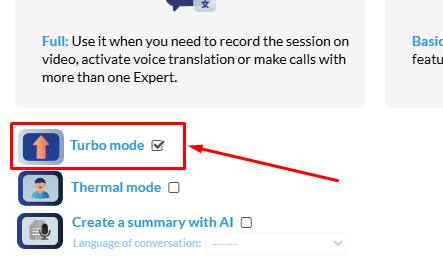
3. Enable “turbo mode” when you start a call. It will make better use of the network.
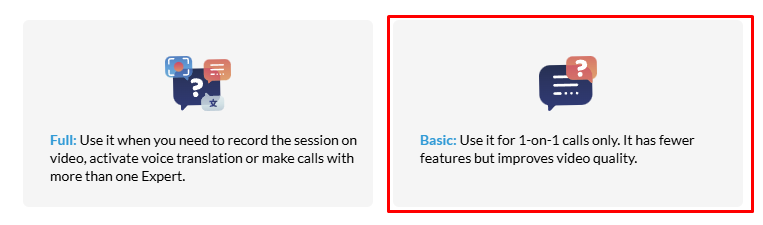
4. Try “basic mode” instead of “full mode” if you don’t need to record the session, invite more experts, or use the translation/transcription feature.
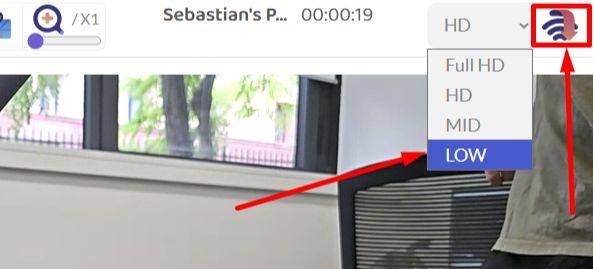
*5. *Lower the video resolution or use the low data mode when the video reduces its quality due to network connectivity issues.
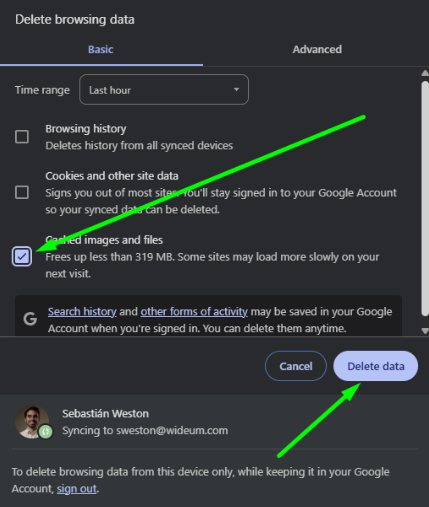
6. Delete the browser’s cache.
Some old files from previous versions of Remote Eye may interfere with the call.
7. Improve the internet connection across the plant
Make sure the Wi-Fi connection is strong and stable throughout the entire plant or production area, especially near the machines where Remote Eye will be used. Consider installing additional access points, mesh Wi-Fi systems, or industrial-grade routers to avoid weak spots or disconnections during calls.
8. Use a portable modem or satellite internet when traveling
When you’re using smartglasses outside the plant—such as during travel, field visits, or in remote areas—a portable 4G/5G LTE modem is highly recommended. In locations where mobile signal is weak or unavailable, consider satellite internet options like:
- Starlink Roam (by SpaceX) – Portable, high-speed satellite internet for remote areas.
- Iridium GO! exec – Global satellite hotspot with lower bandwidth, good for audio and basic video.
- Inmarsat BGAN terminals – Designed for remote professional use with reliable coverage.
These solutions offer greater flexibility and ensure a stable connection wherever you are.
9. Use high-performance devices
Older or low-end smartglasses and smartphones may struggle with video processing and connectivity. Using newer, high-spec devices with good antennas and support for modern network bands will result in better call quality and stability.
10. Do not invite other experts or technicians to the call on Basic mode.
We’ve enabled the option to invite more experts or technicians to the call in Basic mode in case you really need it, but doing so will deteriorate the stability a lot since it requires much more internet bandwidth to happen. Each new guest requires hosting a whole new call.
Feedback

Post your comment on this topic.